
Precision & Expertise in Shop Drawings with Tekla
Tekla
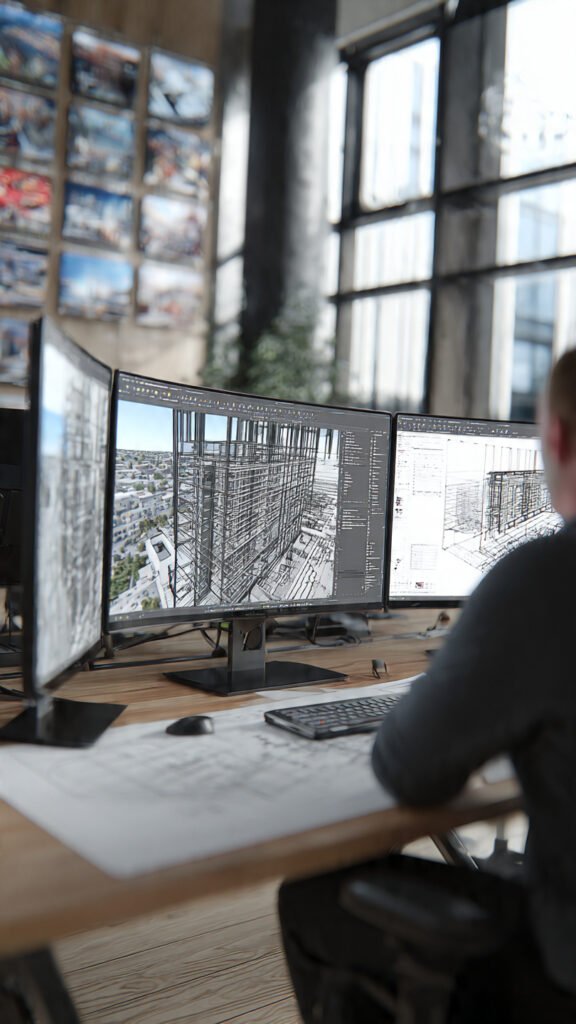
At Ahmed Construction Company (Acco), we understand that accurate shop drawings are the backbone of successful construction projects. Our team of experienced professionals leverages Tekla software to produce precise, high-quality 3D and 2D shop drawings for steel structures, MEP systems, and architectural elements.By integrating Tekla’s advanced modeling capabilities, we ensure every component fits perfectly, minimizing errors and saving valuable time on-site. Our shop drawings are not just technical documents—they are a visual roadmap that guarantees smooth execution and coordination across all project teams.Whether it’s a commercial complex, residential building, or industrial facility, our Tekla expertise ensures that your project progresses efficiently, safely, and on schedule.Key Highlights:Accurate 3D & 2D modeling Clash detection and error minimization Time-saving coordination with contractors High-quality shop drawings tailored for fabrication and site installation
Expert Tekla Services in Pakistan – Precision 3D Modeling for Complex Structures
Introduction: When 2D Drawings Are Not Enough
You have a complex industrial project—a steel-framed factory, a multi-story parking garage, a pre-engineered building, or a hi-rise structure with intricate connections. 2D AutoCAD drawings show you slices of the building, but they do not show how everything fits together in three dimensions. A beam clashes with a brace. A connection plate is too close to a column flange. Rebar congestion makes concrete placement impossible. These errors are invisible in 2D—until fabrication and construction begin. The result? Expensive rework, project delays, and frustrated teams.
For over 25 years, ACCO has been solving this problem with Tekla—the world’s most advanced structural BIM software. Our Tekla services in Pakistan deliver detailed 3D models that show every steel member, every bolt, every weld, and every rebar before fabrication begins. We produce clash-free models, accurate shop drawings (single part, assembly, general arrangement), CNC files for automated fabrication, and material reports for procurement. Whether you are building a textile mill in Faisalabad, a warehouse in Karachi, a hi-rise tower in Lahore, or a pre-engineered building anywhere in Pakistan, ACCO delivers. And because we integrate with our broader architectural design services in Pakistan, our Tekla models coordinate perfectly with architectural and MEP systems.
What Are Tekla Services? (Pakistan Context)
Tekla (now Trimble Tekla Structures) is Building Information Modeling (BIM) software specifically designed for structural engineering, steel detailing, and concrete reinforcement. Unlike general-purpose BIM tools, Tekla excels at: structural steel detailing (3D modeling of beams, columns, braces, connections), concrete reinforcement detailing (3D rebar models with bending schedules), cast-in-place and precast concrete detailing, connection design and verification (including bolt and weld detailing), shop drawing generation (single part, assembly, GA drawings), CNC data export (for automated steel fabrication), and material takeoffs and reporting (tonnage, piece counts, bolt quantities).
Why are Tekla services so critical for Pakistani projects? Consider a steel-framed factory in Faisalabad. Without a Tekla model, fabricators work from 2D AutoCAD drawings. They miss connection clashes. Bolts are ordered incorrectly. Steel arrives on site and does not fit. With a Tekla model, we detect clashes before fabrication. We generate CNC files so automated cutting and drilling are precise. We produce accurate bolt lists so no shortages occur. For a hi-rise building in Lahore, Tekla models rebar congestion at beam-column joints—allowing us to adjust designs before rebar is cut. ACCO’s Tekla services in Pakistan bring industrial-grade BIM to local projects, reducing rework by 30-50% and accelerating fabrication and construction.
Pakistan’s industrial and commercial construction is growing. CPEC projects demand international BIM standards. Large contractors are requiring Tekla models for clash detection. ACCO has been providing professional Tekla services to Pakistani fabricators, contractors, and developers for over a decade.
Ahmed Construction Company (ACCO) – Your Tekla BIM Partner
With over 25 years of experience, ACCO is one of Pakistan’s most trusted names in structural engineering and BIM modeling. From our head office in Gulberg-III, Lahore, and a regional office in Karachi, we have delivered Tekla services for clients including Meezan Bank, Bata, PTC, BUITMS, Savour Foods, Alpine, Lake View, and Gerry DNATA—many of whom require detailed Tekla models for their industrial and commercial facilities. Our team includes certified Tekla modelers, structural engineers, and steel detailers who work collaboratively under one roof.
What makes ACCO different is our engineering depth. We do not just model what you give us. Our structural engineers review designs for constructability. We identify connection issues before modeling begins. We optimize steel sections and connection types to reduce fabrication costs. And because we also build and fabricate, our Tekla models are practical—not just theoretical. When you choose ACCO for Tekla services in Pakistan, you choose a partner who understands that a good BIM model saves money on the shop floor and on site. Learn more about our integrated approach on our Architectural Engineering page.
Our Comprehensive Tekla Service Offerings (Detailed Breakdown)
1. Structural Steel Detailing in Tekla
Steel structures demand precision. ACCO provides complete Tekla steel detailing including: 3D modeling of all steel members (columns, beams, braces, girts, purlins, and secondary members), connection detailing (moment connections, shear connections, bracing connections, base plates, and stiffeners), bolt and weld detailing (bolt sizes, grades, patterns; weld sizes, types, and symbols), camber and sweep modeling (for long spans or heavy loads), and clash detection (steel vs. steel, steel vs. concrete, steel vs. MEP).
- 3D model: Full structural steel model with all connections
- Single part drawings: Each beam, column, brace with dimensions and marks
- Assembly drawings: Sub-assemblies (e.g., column with base plate, stiffeners)
- General arrangement (GA) drawings: Floor plans, elevations, sections
- CNC files: DSTV format for automated cutting and drilling (beams, plates, columns)
- Material reports: Tonnage by member type, bolt lists, washer/nut quantities
2. Tekla Modeling for Pre-Engineered Buildings (PEBs)
PEBs are steel structures—and Tekla is ideal for them. ACCO provides Tekla services for PEBs including: modeling of tapered frames (columns and rafters), cold-formed purlin and girt placement, bolted splice connections (typical in PEBs), bracing (roof and wall x-bracing, portal bracing), and integration with insulated panels (PUF/PIR). We can work from PEB manufacturer catalogs or custom designs.
3. Concrete Rebar Detailing in Tekla
Reinforced concrete (RC) structures benefit from 3D rebar modeling. ACCO provides Tekla rebar detailing including: 3D modeling of rebar for foundations (footings, rafts, pile caps), columns, beams, slabs (one-way, two-way, flat plate), and shear walls. We produce rebar bending schedules (with exact lengths, bend angles, hook dimensions), 3D placement drawings (showing bar positions in forms), clash detection (rebar vs. rebar, rebar vs. embeds, rebar vs. post-tensioning), and quantity reports (tonnage by bar size, total lengths).
4. Precast & Cast-in-Place Concrete Detailing
Tekla excels at concrete elements fabricated off-site. ACCO provides detailing for precast concrete: wall panels, beams, columns, hollow-core slabs, and stairs. We detail embedded plates, lifting inserts, connection hardware (welded or bolted), grout pockets, and reinforcement within the precast element.
5. Connection Design & Verification in Tekla
Connections are the most critical part of steel structures. ACCO uses Tekla’s connection library and custom macros to: model bolted and welded connections, check bolt spacing (edge distances, minimum and maximum spacing), verify weld accessibility (can the welder reach the joint?), and run clash checks between connection plates and adjacent members.
6. Clash Detection & Multi-Discipline Coordination
Tekla models allow us to coordinate structural steel with: architectural elements (walls, partitions, ceilings), MEP systems (HVAC ducts, plumbing pipes, electrical conduits, cable trays), and concrete structure (embedded plates, anchor bolts, sleeves). ACCO can import IFC models from other BIM software (Revit, ArchiCAD) into Tekla for comprehensive clash detection.
7. CNC Data Export for Automated Fabrication
Modern steel fabrication uses CNC machines. ACCO exports DSTV (NC) files from Tekla for: CNC beam lines (drilling holes, cutting copes, cutting to length), CNC plate cutting (plasma or laser for base plates, gusset plates, stiffeners), and CNC coping and notching (for beam-to-beam connections). These files reduce fabrication errors and accelerate shop production.
8. Quantity Takeoffs & Material Reporting
Accurate procurement starts with accurate quantities. ACCO generates from Tekla: steel tonnage reports (by member type, by grade, or by erection sequence), rebar tonnage reports (by bar size and length), bolt and anchor lists (quantities, sizes, grades), weld volume estimates (for costing), and paint area calculations (surface area for coating).
9. Construction Sequence Simulation (4D Tekla)
For complex projects, ACCO uses Tekla to simulate construction sequence: lift planning (which steel pieces arrive in which order?), erection sequence (columns first, then beams, then bracing, etc.), crane placement and reach (coordinate with model), and clash detection of temporary conditions (crane boom vs. structure). We can link the Tekla model to scheduling software (Navisworks, Synchro) for 4D BIM.
Comparison: Why ACCO for Tekla Services in Pakistan?
Comparison: Tekla Capabilities
表Our Step-by-Step Tekla Service Process
- Project Input & Design Review: You provide design drawings (CAD or PDF), structural calculations, connection criteria, and any shop standards. We review for completeness and flag potential issues before modeling begins.
- Tekla Model Setup & Standards Configuration: We set up a Tekla project: grid system (based on architectural grids), number series (part marks, assembly marks), view and filter settings, connection library (preferred connection types), and reporting templates (for material takeoffs).
- 3D Structural Modeling: We model all steel members (columns, beams, braces, girts, purlins) or concrete elements in Tekla. We add all connections (bolted or welded) using Tekla’s connection library.
- Clash Detection & Coordination: We run model checking: clash detection (steel vs. steel, steel vs. concrete). For integrated projects, we import architectural and MEP IFC models to detect cross-discipline clashes.
- Connection Optimization & Adjustments: We review connection details for constructability. We adjust bolt spacing, connection plate sizes, and weld access as needed based on fabrication experience.
- Shop Drawing Generation: From the Tekla model, we produce: single part drawings (each piece with dimensions, marks, material), assembly drawings (built-up members), general arrangement drawings (plan, elevation, section views with dimensions and marks), and bolt/weld lists.
- CNC Data Export (for Steel Fabrication): We export DSTV (NC) files for: beam lines (cutting, drilling, coping), plate cutting (base plates, connection plates, gusset plates), and angle/channel processing. We include standard CAM instructions.
- Material Reports & Documentation: We generate: steel tonnage report (by size, by location, by erection sequence), bolt and anchor schedule (quantities, sizes, grades), weld volume estimate (for costing), and paint area estimate.
- Client Review & Model Handover: You can review the Tekla model using Tekla BIMsight (free viewer) or via our shared screen. We incorporate your feedback. You receive full Tekla model (.DB) file, IFC export (for coordination), and all shop drawings in PDF/DWG.
Why Clients Across Pakistan (Nationwide) Choose ACCO for Tekla Services
From steel detailing for textile mill expansions in Faisalabad to rebar modeling for hi-rise towers in Lahore, from PEB detailing for warehouses in Karachi to complex steel connections for industrial projects in Port Qasim, ACCO has delivered Tekla services that fabricators and contractors trust. We understand that a Tekla model is not just a 3D picture—it is a database of information that drives fabrication, procurement, and construction.
Our team has extensive experience serving industrial and commercial clients across DHA, Bahria Town, and major industrial zones. We have worked for clients like Savour Foods, Alpine, Lake View, and Gerry DNATA—names that demand precision and reliability. When you work with ACCO, you get Tekla models that are accurate, optimized for fabrication, and fully coordinated. For a deeper look at our structural engineering capabilities, visit our Architectural Engineering page or review our Our Projects page.
ACCO by the Numbers: Tekla Excellence in Pakistan
- 10+ years of Tekla modeling and detailing experience
- 200+ projects completed with Tekla models and shop drawings
- 100+ structural steel detailing projects for industrial and commercial buildings
- 50+ concrete rebar detailing projects using Tekla’s rebar module
- 30+ pre-engineered building (PEB) Tekla models
- 2 offices (Lahore, Karachi) serving all of Pakistan plus 5 countries internationally
- 10+ certified Tekla modelers and structural engineers on staff
- 30-50% rework reduction reported by fabricators using our Tekla models
- 100% CNC-ready output (DSTV files) on all steel projects
- 1-3 weeks typical turnaround for model and shop drawings for a medium-sized steel building
Mid-Page Call to Action – Get Precision Tekla Modeling for Your Project
Stop relying on error-prone 2D drawings for complex steel and concrete structures. ACCO’s Tekla services in Pakistan deliver detailed 3D models, accurate shop drawings, and CNC-ready files that eliminate fabrication errors and accelerate construction. Whether you are a steel fabricator needing DSTV files, a contractor requiring clash-free models, or a developer wanting accurate quantity takeoffs, ACCO is ready. Call +92 322 800 0190 or email info@acco.com.pk to discuss your Tekla needs. You can also visit our Contact Us page to upload your design drawings for a fast quote.
Frequently Asked Questions (FAQ) – Tekla Services & Structural BIM
1. What is architectural engineering, and how does it relate to Tekla modeling?
Architectural engineering integrates structural, MEP, and architectural systems. In Tekla modeling, this means our models include not just steel or rebar but also coordination with architectural elements (walls, ceilings, finishes) and MEP systems (ducts, pipes, conduits). ACCO’s architectural engineering team ensures Tekla models are fully coordinated with all building systems.
2. How do I get a floor plan designed for my house? Does Tekla help with houses?
For residential homes, 2D AutoCAD is typically sufficient unless you have complex steel or concrete framing. For your home, start with our home floor plan design service using AutoCAD. For complex houses (steel frames, large spans, or hillside construction with complex foundations), Tekla may be appropriate. Explore our Home Floor Plan Design page for residential projects.
3. What is the difference between Tekla and AutoCAD for structural work?
AutoCAD is general-purpose 2D/3D drafting. Tekla is specialized structural BIM: parametric 3D models that update automatically, built-in connection libraries, automated shop drawing generation, CNC file export, and clash detection. For complex steel or concrete structures, Tekla is significantly more efficient and accurate than AutoCAD. ACCO offers both services—contact us to determine which is right for your project.
4. Do you provide 3D walkthroughs from Tekla models?
Yes. Tekla models can be exported to rendering software or viewed directly in Tekla’s viewer (Tekla BIMsight). We can also export Tekla models to Navisworks or Revit for integration with 3D architectural walkthrough videos. For photorealistic renderings, we typically recommend our dedicated Architectural 3D Modeling service.
5. Can ACCO produce Tekla models for commercial plazas and hospitals?
Yes. For steel-framed commercial plazas or hospital structures (often steel for speed), Tekla is ideal. For concrete-framed hospitals, we use Tekla for rebar detailing. We can integrate Tekla models with MEP BIM models (HVAC, medical gas, plumbing) for complete coordination. View our Our Projects page for examples.
6. What file formats do you deliver from Tekla?
We deliver: native Tekla .DB file (for clients with Tekla licenses), IFC (industry foundation classes – for import into Revit, ArchiCAD, Navisworks), DSTV/NC (CNC files for steel fabrication), PDF and DWG (shop drawings), and Excel (material reports, bolt lists, rebar schedules).
7. How much do Tekla services cost in Pakistan?
Costs vary by project complexity, steel tonnage, rebar volume, and level of detail. For structural steel detailing (full Tekla model + shop drawings + CNC files): PKR 8,000-15,000 per ton of steel for simple structures, PKR 15,000-25,000 per ton for complex connections. For rebar detailing (Tekla model + bending schedules + placement drawings): PKR 3,000-7,000 per ton of rebar. Contact ACCO for a detailed quote based on your specific requirements—we provide transparent pricing with no hidden fees.
8. Can you work from my existing 2D AutoCAD drawings?
Yes. ACCO can use your 2D AutoCAD drawings as reference to build a Tekla model. We will verify dimensions and coordinate with you to resolve any conflicts or missing information before modeling begins. This is common for projects where design was completed in 2D but fabrication requires 3D BIM.
9. Do you provide rebar detailing in Tekla for concrete foundations?
Yes. ACCO provides full rebar detailing in Tekla for: spread footings, combined footings, mat/raft foundations, pile caps, grade beams, columns (round or rectangular), beams (including drop panels), slabs (one-way, two-way, flat plate), and shear walls. We produce bending schedules and 3D placement drawings.
10. Can you coordinate Tekla models with MEP designs from other consultants?
Yes. ACCO can import IFC files from Revit (Architectural, MEP) into Tekla. We run clash detection between structural steel/rebar and MEP (ducts, pipes, conduits, cable trays). We then adjust connection plates or beam penetrations to resolve clashes. This is essential for complex buildings. Learn more on our BIM Modeling page. For reference on engineering standards, consult the Pakistan Engineering Council and PCATP.
Explore More of ACCO’s BIM & Structural Capabilities
Tekla is one of several BIM tools ACCO masters. We also provide Revit (architectural and MEP), Navisworks (clash detection and 4D sequencing), and AutoCAD (2D drafting). Whether you need a full Tekla model for steel fabrication, rebar detailing for a concrete structure, or coordination across Tekla and Revit, ACCO delivers. For integrated structural and architectural BIM, visit our BIM Modeling page. For 3D rendering and walkthroughs, see our Architectural 3D Modeling page.
Final Call to Action – Get Your Tekla Quote Today
Do not let fabrication errors and construction clashes cost you time and money. Choose ACCO’s Tekla services in Pakistan and get precision 3D models, accurate shop drawings, and CNC-ready files that deliver results. Our team is ready to discuss your project—whether it is a small steel mezzanine or a multi-story industrial complex. Contact us:
Phone: +92 322 800 0190 | +923 111 749 849
Email: info@acco.com.pk
Lahore Office: Office 2, 3rd Floor, Bigcity Plaza, Gulberg-III
Karachi Office: By appointment
Hours: Monday-Saturday, 9:00 AM – 6:30 PM
Ready to proceed? Send your structural drawings, design files, or project description via our Contact Us page. We will provide a fixed-price quote and timeline within 2 business days. Let ACCO’s Tekla expertise build your next structure with confidence.